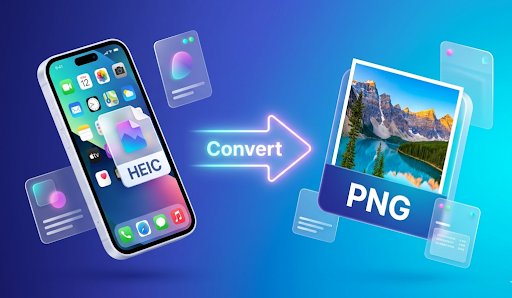
In today’s digital world, we take more photos than ever before. Whether it is a beautiful sunset, a delicious meal, or a memory with friends, our smartphones are always ready. However, if you use an iPhone or a Mac, you might have noticed that your photos are saved as HEIC files.
While HEIC is great for saving space, it can be a big headache when you try to open those photos on a Windows computer, an Android phone, or upload them to a website. This is where a Free HEIC to PNG Converter comes in.
In this guide, we will explain everything you need to know about these files and how you can change them to PNG in just a few seconds.
What is an HEIC File? (The Simple Explanation)
HEIC stands for High Efficiency Image Container. It is a relatively new way to save images. Apple started using this format a few years ago because it does something amazing: it keeps the photo quality very high but makes the file size very small.
Think of it like a magic suitcase. You can fit twice as many clothes in the same suitcase without making it heavier. This helps iPhone users save thousands of photos without running out of storage space.
The Problem with HEIC
The main problem is that HEIC is not “universal.” Most old computers, smart TVs, and many websites do not know how to “read” or show an HEIC image. If you try to open an HEIC file on an old Windows PC, you might just see an error message. This is why people need to convert their photos to a more common format like PNG.
What is a PNG File?
PNG stands for Portable Network Graphics. Unlike HEIC, PNG is a veteran in the digital world. It has been around for a long time and is loved by everyone.
Why do people love PNG?
- Universal Compatibility: Every device in the world—from your fridge to your laptop—can open a PNG.
- No Quality Loss: When you save a photo as a PNG, it stays crisp and clear.
- Transparency: PNGs allow you to have a clear background, which is perfect for logos and icons.
Why Should You Use Our Free HEIC to PNG Converter?
When you have a lot of photos to fix, you want a tool that is fast, safe, and free. Our online converter is designed to make your life easier. Here is why our tool is the best choice for you:
1. It’s Completely Free
You don’t need to pay for expensive software like Photoshop just to change a file format. Our tool is 100% free to use, and there are no hidden fees.
2. No Software to Install
Many people are afraid of downloading programs from the internet because of viruses. With our tool, you don’t have to download anything. It works right inside your web browser (like Chrome, Safari, or Firefox).
3. Super Fast Speed
Time is precious. Our converter uses high-speed servers to process your images. You won’t have to wait for minutes; most conversions happen in the blink of an eye.
4. Privacy and Security
Your photos are your private business. We respect that. When you upload a photo to our converter, it is processed securely and then deleted from our servers automatically after a short time. Your data is never sold or shared.
How to Use the Free HEIC to PNG Converter (Step-by-Step)
Using our tool is as easy as ABC. Even if you aren’t a “tech expert,” you can do this. Just follow these simple steps:
Step 1: Open your browser and go to a trusted site like AllFileTools.com. And use tool this Free HEIC to PNG Converter
Step 2: Click “Select Files” or “Upload” to choose your HEIC image from your device.
Step 3: Select “PNG” as your output format from the settings menu.
Step 4: Click the “Convert” button and wait a few seconds for the magic to happen.
Step 5: Click “Download” to save your brand-new PNG file to your gallery or computer.
When Do You Need to Convert HEIC to PNG?
There are many times in daily life when you will find this tool helpful:
- School Projects: If you are a student making a PowerPoint or a Word document, HEIC files might not show up. Converting them to PNG ensures your teacher can see your hard work.
- Job Applications: If you are uploading a photo of your ID or a headshot for a job, most websites only accept PNG or JPG.
- Social Media: Some older social media apps or blog platforms still struggle with HEIC.
- Printing Photos: Many online photo printing services require PNG files to ensure the colors come out perfectly.
HEIC vs. PNG: Which One is Better?
This is a common question. The truth is, both are good for different things.
| Feature | HEIC | PNG |
| File Size | Very Small (Saves Space) | Larger |
| Quality | High | Very High |
| Compatibility | Limited (Mostly Apple) | Excellent (Works Everywhere) |
| Best For | Saving space on iPhone | Sharing, Web, and Printing |
If you are just keeping photos on your phone to look at later, HEIC is fine. But if you want to do anything with those photos—like share them or edit them—PNG is the winner.
Key Features of Our Online Tool
To make sure you get the best experience, we have added several features that other converters don’t have:
Batch Conversion
Do you have 50 photos from your vacation? Don’t worry. You don’t have to convert them one by one. Our tool allows you to upload a whole bunch of photos at once. This saves you a lot of time and clicking.
High-Quality Output
Some converters make the photo look blurry or “pixelated” after conversion. Our tool uses a special algorithm to make sure the PNG looks exactly like the original HEIC.
Works on All Devices
Whether you are using a Windows PC, a Mac, an Android phone, or an iPad, our website works perfectly. As long as you have an internet connection, you can use our tool.
No Registration Required
We hate long forms and “Sign Up” buttons just as much as you do. You don’t need to give us your email or create a password. Just show up, convert your files, and go about your day.
Tips for Getting the Best Results
To make sure your images look great, keep these tips in mind:
- Check Your Internet: A stable internet connection makes the upload and download process much faster.
- Organize Your Folders: Before uploading, put all your HEIC files in one folder so you can select them all at once.
- Check Storage: PNG files are a bit bigger than HEIC files, so make sure your computer has enough space to save the new versions.
FAQs
Is it really free?
Yes! There are no limits on how many files you can convert, and we never ask for credit card information.
Will my photos look different after converting?
No. The colors and details will stay the same. The only thing that changes is the file format so that more devices can open it.
Is my privacy safe?
Yes. We use SSL encryption to protect your data while it’s being uploaded. We do not store your images permanently.
Can I convert PNG back to HEIC?
While our tool is specifically for HEIC to PNG, many people prefer PNG because it is easier to use across different platforms.
Do I need to be a pro to use this?
Not at all. If you can click a mouse or tap a screen, you can use our tool. It is designed for everyone, from 4th graders to grandparents!
Conclusion: Make Your Photos Work for You
Technology should make our lives easier, not harder. You shouldn’t have to worry about “file formats” or “compatibility” when you just want to see a photo of your family or finish a project for work.
Our Free HEIC to PNG Converter is the simplest, fastest, and most secure way to bridge the gap between Apple’s new technology and the rest of the world. By turning your HEIC images into PNGs, you ensure that your memories are ready to be shared, printed, and viewed by anyone, anywhere.
Don’t let a file extension stop you. Try our free tool today and see how easy it is to take control of your digital photos!
🔹 Explore more powerful file conversion and online utilities at AllFileTools –
🔹 For technical support, digital solutions, and expert services, visit LetDigitalFly IT Services –
🔹 Discover additional career and productivity resources at Resume Slip Builder